In terms of underlying foundation, Groovy is identical to Java. They all rely on JVM. The advantage of Groovy is that it enhances Java so that programs can be written more compactly and more intuitively. First, Groovy looks like a dynamic script language which is quite different from traditional languages like Java. Users don't need to compile groovy files into .class files manually. Groovy compiler does this automatically for us when a program is executed. Besides, Groovy provides extensive support to make programming an easy job. For example, you can write code like this: mylist = [1, 3, 5]; mylist.each({it -> println it});
Collections:
(1) Range (http://groovy.codehaus.org/api/groovy/lang/Range.html)
(1) Range (http://groovy.codehaus.org/api/groovy/lang/Range.html)
Declaration: dot operator (..)
(leftBound..rightBound) inclusive(leftBound<= value <=rightBound)
(leftBound..<rightBound) half-exclusive(leftBound<=value<rightBound)
Note: It is not necessary to let leftBound smaller than rightBound. Range can have a lower left bound and a higher right bound. It is called reverse range.
Declaration Samples:
('a'..'c') ('ab'..'az')
new IntRange(0,10)
(0..10).each({element -> println element})
Illegal samples:
('a'..'bc') ('ab'..'bc')
Data objects can be used in ranges. Unit of increase or decrease is one day.
Implementation:
IntRange, EmptyRange, ObjectRange
Useful Functions:
each
contains
isCase (used in switch statement. This has the same meaning as contains)
Usage:
(1)money = 10000
switch(money){
case 0..1000: taxRate = 0.1; break
case 1001..5000: taxRate = 0.2; break
default: taxRate = 0.3; break
}
(2)payroll = [1000, 2000, 1004, 4000];
filter = 2000..3000
pryroll.grep(filter)
Customized Range:
Users can create their own types which can be used with ranges, provided following requirements are satisfied:
(1) The type implements functions previous and next.
(2) The type implements compareTo function by overriding the <=> spaceship operator.
(2) List (leftBound..rightBound) inclusive(leftBound<= value <=rightBound)
(leftBound..<rightBound) half-exclusive(leftBound<=value<rightBound)
Note: It is not necessary to let leftBound smaller than rightBound. Range can have a lower left bound and a higher right bound. It is called reverse range.
Declaration Samples:
('a'..'c') ('ab'..'az')
new IntRange(0,10)
(0..10).each({element -> println element})
Illegal samples:
('a'..'bc') ('ab'..'bc')
Data objects can be used in ranges. Unit of increase or decrease is one day.
Implementation:
IntRange, EmptyRange, ObjectRange
Useful Functions:
each
contains
isCase (used in switch statement. This has the same meaning as contains)
Usage:
(1)money = 10000
switch(money){
case 0..1000: taxRate = 0.1; break
case 1001..5000: taxRate = 0.2; break
default: taxRate = 0.3; break
}
(2)payroll = [1000, 2000, 1004, 4000];
filter = 2000..3000
pryroll.grep(filter)
Customized Range:
Users can create their own types which can be used with ranges, provided following requirements are satisfied:
(1) The type implements functions previous and next.
(2) The type implements compareTo function by overriding the <=> spaceship operator.
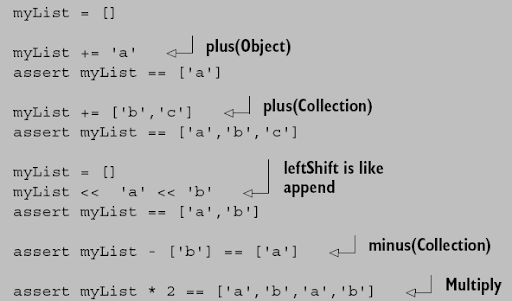
Declaration:bracket operator([item1, item2, item3])
Declaration Samples:
list = [1, 2, 3]
list2 = ['abc', 2, 'def']
Usage:
println list[0] //print 1
println list[0..2] //print 1 2 3
println list[0,1] //print 1 2
list2[3] = 10 //extend the list automatically, list2 becoms ['abc',2,'def',10]
list2[0..2] = 100 //list2 becomes [100,10]
list2[0..2] = [1 100] //list2 becoms [1, 100, 10]
Note: access indices can be negative numbers which count from the end of the list. For example: list[-1].
(3) Map Declaration Samples:
list = [1, 2, 3]
list2 = ['abc', 2, 'def']
Usage:
println list[0] //print 1
println list[0..2] //print 1 2 3
println list[0,1] //print 1 2
list2[3] = 10 //extend the list automatically, list2 becoms ['abc',2,'def',10]
list2[0..2] = 100 //list2 becomes [100,10]
list2[0..2] = [1 100] //list2 becoms [1, 100, 10]
Note: access indices can be negative numbers which count from the end of the list. For example: list[-1].
Closure
Closures are objects essentially.
Closures are mainly used to represent a specific behavior. In Java, an object has behavior as well as data.
If the closure needs only a single parameter, Groovy provides a default name --it. Print a file: new File('input.txt').eachLine{ println it }
Declaration:
(1..10).each{ele -> println ele} or (1..10).each({ele -> println ele})
def clo = {ele -> println ele}
def Closure getClosure(){
return { ele -> println ele }
}
You can use methods as closures.
Call closures:
closure(parameters) or closure.call(parameters)
Closures are objects essentially.
Closures are mainly used to represent a specific behavior. In Java, an object has behavior as well as data.
If the closure needs only a single parameter, Groovy provides a default name --it. Print a file: new File('input.txt').eachLine{ println it }
Declaration:
(1..10).each{ele -> println ele} or (1..10).each({ele -> println ele})
def clo = {ele -> println ele}
def Closure getClosure(){
return { ele -> println ele }
}
You can use methods as closures.
Call closures:
closure(parameters) or closure.call(parameters)


 Posts
Posts


